
Anomaly detection is a data-driven concept that is widely used by businesses across industries in order to identify potential anomalies in a performance of a product. The concept applies in multiple situations, from fraud detection, to performance monitoring, budget optimization etc.
For this demonstration, we’ll be using a simple dataset and the Prophet algorithm. Its not a pure anomaly detection algorithm but it can serve this purpose too. We’ll work with a dataset detailing prices for various fuel types. You can download it from this website (from the 1st table).
We’ll be using a Collab notebook, so there’s no need to download any additional tools to run the provided code.
#Download necessary libraries
!pip install pandas
!pip install matplotlib
!pip install prophet

#Load necessary libraries
from prophet import Prophet
# Initialize the model and set its sensitivity
model = Prophet(interval_width=0.95)
# Fit the model
model.fit(data)
# Forecast on the original data to get the bounds
forecast = model.predict(data)#Calculate the anomalies plus the upper and lower bounds.
anomalies = data.loc[(data['y'] > forecast['yhat_upper']) | (data['y'] < forecast['yhat_lower'])]#Visualize the results
import matplotlib.pyplot as plt
# Plot the Prophet forecast
fig1 = model.plot(forecast)
# Overlay the anomalies
plt.scatter(anomalies['ds'], anomalies['y'], color='red', s=50, label='Anomalies')
plt.legend()
plt.show()
#The red dotes are dates that are considered as anomalies.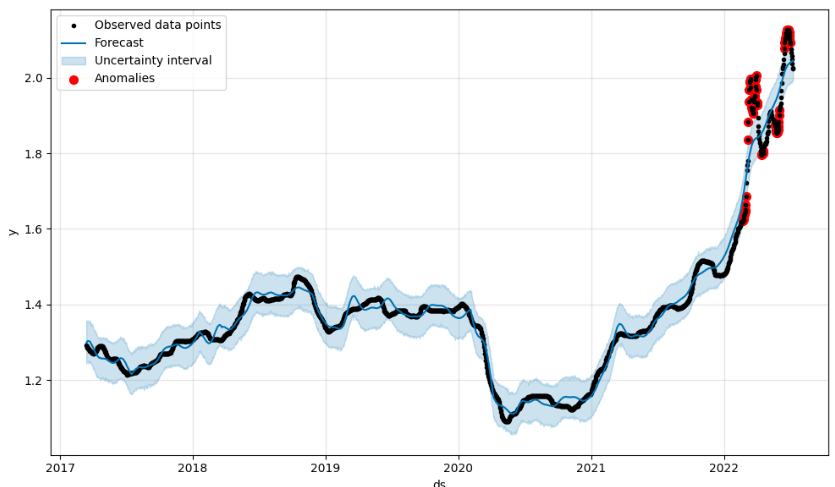
#Print the data points that were flagged as anomalies
print(anomalies[['ds', 'y']])
ds y
1806 2022-02-22 1.621
1807 2022-02-23 1.623
1808 2022-02-24 1.626
1809 2022-02-25 1.635
1810 2022-02-26 1.640
... ... ...
1932 2022-06-28 2.123
1933 2022-06-29 2.120
1934 2022-06-30 2.112
1935 2022-07-01 2.102
1936 2022-07-02 2.094Run the code on your own, adjust the interval_width and check the different results that will be generated. Also, try to expand the capabilities of Prophet or try other algorithms (like Luminaire) to get a better understanding of how anomaly detection works.